
Why Domotion
Animated product demos usually mean a heavy MP4, a low-quality GIF, a fragile live iframe, or a stack of screenshots. Domotion gives you one self-contained animated SVG instead. Here’s why that’s worth it.
How it compares
Section titled “How it compares”The closest choices answer different needs. This focused table stays readable on a phone; less-direct alternatives follow below.
| Need | Domotion SVG | Screen recording | Live iframe |
|---|---|---|---|
| Crisp when enlarged | Yes | No; fixed resolution | Yes |
Embeds as a plain <img> |
Yes | No | No |
| Works offline with no runtime | Yes | Yes | No |
| Rebuild after a source change | Run the capture again | Re-record the flow | Updates live |
| Simulated interaction | Yes | Recorded pixels | Real interaction |
| Main trade-off | Not a live DOM | Larger, fixed-resolution media | Runtime, security, and availability dependencies |
Other formats can still be the right fit:
- GIF embeds widely, but is fixed-resolution and inefficient for many colors or longer motion.
- Lottie is scalable and compact for authored vector animation, but needs a player and is not a capture of arbitrary HTML/CSS.
- Hand-built CSS can be tiny and flexible, but recreating a product UI by hand raises authoring and maintenance cost.
Domotion’s trade-off: it’s raster-faithful to Chromium’s paint rather than a live DOM, and animation plays wherever CSS runs (see below). In exchange you get one dependency-free file whose captured font choices do not change with the viewer’s installed fonts.
It embeds where video can’t
Section titled “It embeds where video can’t”A <img src="demo.svg"> drops into places a <video> can’t — Markdown docs,
slide decks, PDFs, and anywhere a content-security-policy blocks external media
or scripts. The SVG carries no external dependencies — font data and images are
embedded, and there is no JavaScript — so it can’t 404 a dependency and
works fully offline.
Where the CSS animation actually plays depends on the host. It animates in any real browser: your docs site, a landing page, GitLab, self-hosted HTML. A few surfaces sanitize SVG and show a static first frame instead — GitHub READMEs and npm package pages proxy and strip the animation, and many email clients drop SVG entirely. For those, export a crisp static frame, a GIF, or an MP4 (see Embedding & reach for where it plays and how to export for the rest). Either way it stays one self-contained file with no external dependencies.
Tiny next to video
Section titled “Tiny next to video”Domotion ships vectors and CSS keyframes instead of pixels for every frame, so many UI demos are smaller than an equivalent video or GIF. The exact result depends on page complexity, embedded images, capture options, duration, and codec settings—measure the files you plan to ship. A smaller above-the-fold asset can reduce transfer and decode work, and it lazy-loads like any other image.
Resolution-independent — render once, fits every device
Section titled “Resolution-independent — render once, fits every device”A raster video is baked at one resolution; retina, 4K, and print make it look
soft, and “supporting” them means re-encoding multiple sizes. An SVG is
resolution-independent: the same file is razor-sharp on a phone, a 5K
display, a projector, and on paper — no re-render, no re-compress, no @2x set.
Pixel-faithful text without viewer-side fallback
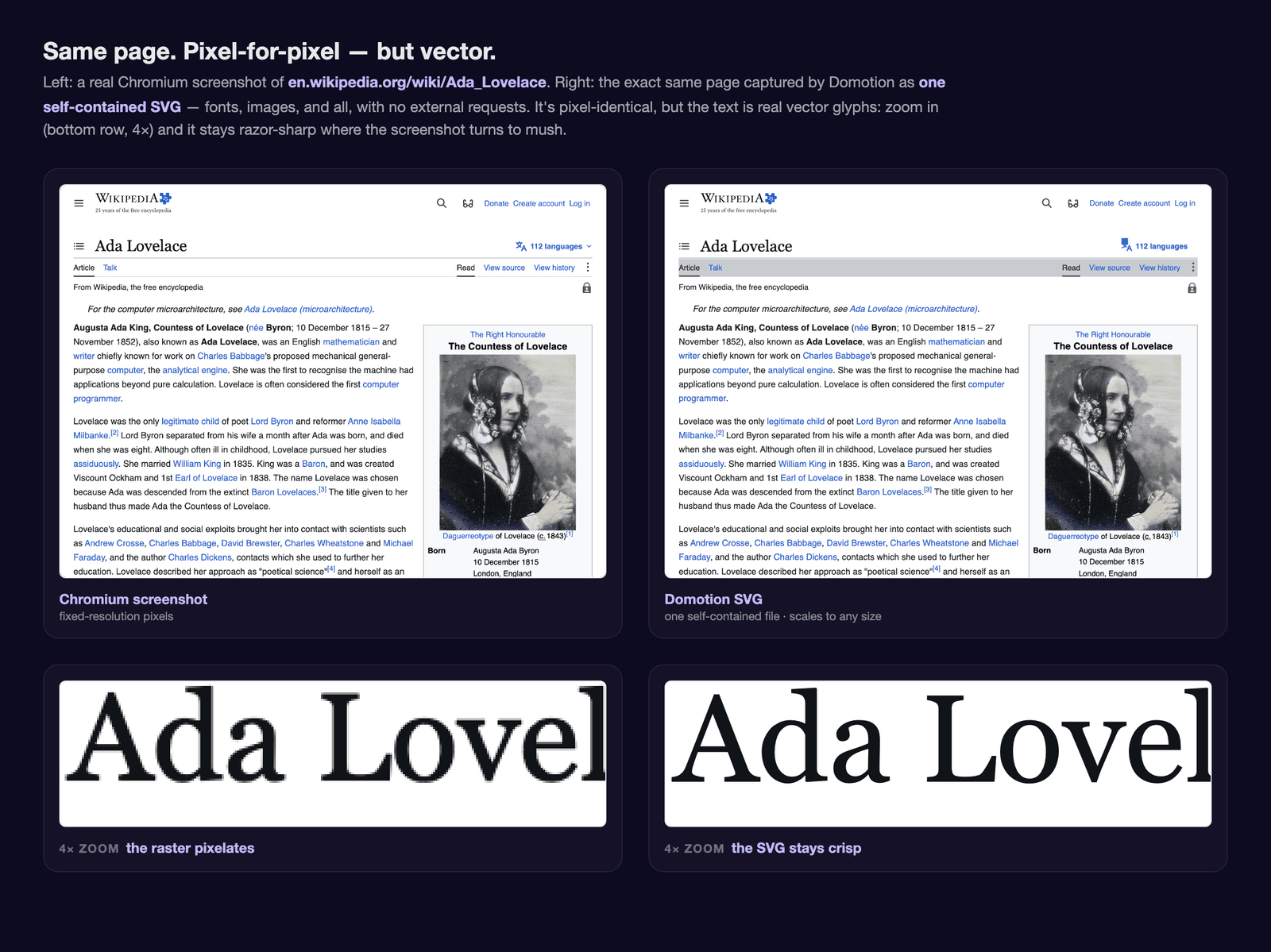
Section titled “Pixel-faithful text without viewer-side fallback”Domotion records the exact glyphs Chromium selected, embeds subset font data and
explicit positioning, and uses vector paths where required. The result stays
crisp at any zoom and never asks the viewer’s system to choose a replacement
font. Consumer rasterizers can still differ slightly in antialiasing and
hinting; the glyph selection and layout do not. When embedded via <img>, treat
the output as an image rather than semantic page text and provide an alt.
Repeatable — for demos and review
Section titled “Repeatable — for demos and review”A demo is defined by a small JSON config (or a script), so regenerating it after a UI change is one command, not a re-record. On the same platform, the same input produces the same output byte-for-byte, so you can commit the SVG, diff it in version control, and review rendering changes like code.
Output is calibrated per platform — macOS is pixel-exact, while Linux and Windows match within a small native-hinting margin — so regenerate baselines on the same OS you commit from. That makes a captured demo a usable golden fixture for catching unintended rendering drift, though Domotion itself doesn’t ship a pass/fail visual-diff for your own app.
For larger productions, Domotion Studio keeps the story, scenes, timeline, annotations, and revision history in one validated, versioned project file while generated media remains replaceable.
Themeable and composable
Section titled “Themeable and composable”Transparent backgrounds round-trip, so a demo drops onto any host background. Dark/light captures come from the same source. And because each demo is just an SVG, you can composite them — nest an animated terminal inside an animated desktop, place a scrolling site inside a browser bezel — without re-shooting.
Built for the AI era
Section titled “Built for the AI era”Domotion is driven by a declarative config and a documented design playbook, so an AI agent can author, render, look at the pixels, and iterate on a demo end-to-end. See Using AI to drive Domotion.
Ready to try it? Head to the quick start, or see what it produces in the showcase.