Form controls
Inputs, checkboxes, range sliders, progress bars, color pickers — synthesized SVG that mimics Chromium.
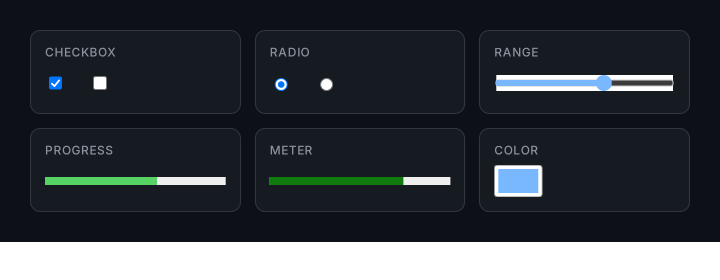
Form controls render their UI through Chromium's user-agent shadow DOM,
which isn't directly captured by walking the visible DOM. Domotion handles
this by detecting form-control tags and synthesizing matching SVG markup
that mimics what Chromium paints, including support for the most common
author-styled ::-webkit-* pseudos.
What round-trips: <input> with value
(rendered as path-mode text), ::placeholder styling
(color / font-style / font-weight), disabled and readonly visual states,
<input type="checkbox"> (checkmark or indeterminate dash),
<input type="radio"> (dot when checked),
<input type="range"> (track + thumb with author-styled
::-webkit-slider-runnable-track and
::-webkit-slider-thumb), <input type="color">
(swatch shows the picker value), <progress> (bar + fill
at value / max; author-styled ::-webkit-progress-bar
and ::-webkit-progress-value), <meter>
(three-zone colouring based on low / high /
optimum), and any <button> with author CSS
applied (it captures as a normal styled element).
The exceptions
<input type="file">— button chrome only; the selected filename text doesn't render yet.<textarea>content — captured viapage.screenshotand embedded as a raster<image>so word-wrap is pixel-perfect to Chromium. Sharp at 1× but doesn't scale crisply like path-mode text.- Bare
<button>/<select>with no author CSS — the UA chrome is partially synthesized. Style the control with CSS for full fidelity. - Open
<select>dropdowns — can't be captured. The open dropdown lives in OS chrome, not in the page DOM. Closed selects (showing the selected option text + chevron) work. - Cursor and focus ring at capture time — captures don't simulate focus / hover / selection state. Set the desired state in Playwright before capturing if you need it.
Capturing inputs in specific states
Because Domotion captures whatever Chromium has painted, you can put an input into any state before capturing:
await page.fill("input.search", "design system");
await page.check("#dark-mode");
await page.locator("#range").evaluate((el: HTMLInputElement) => { el.value = "75"; });
const tree = await captureElementTree(page, "body", vp);
Author-styled pseudos
Domotion's stylesheet walker reads author-defined CSS rules for
::-webkit-progress-bar, ::-webkit-progress-value,
::-webkit-slider-runnable-track,
::-webkit-slider-thumb, and the input shadow pseudos. Rules
matching the captured element are applied to the synthesized SVG so a
custom-coloured progress bar or a styled slider thumb keeps its appearance
in the SVG output.
See also
docs/04-input-pseudos.mdin the repo — design notes on which shadow pseudos are recognized.docs/05-progress-meter-pseudos.md— progress / meter pseudos.