The capture pipeline
What actually happens between setContent() and the returned SVG.
Domotion runs three logical stages: capture inside Chromium, raster fall-back from Node, and render to SVG markup. Knowing where each step happens makes it easier to debug surprising output and to know which parts you can intercept or replace.
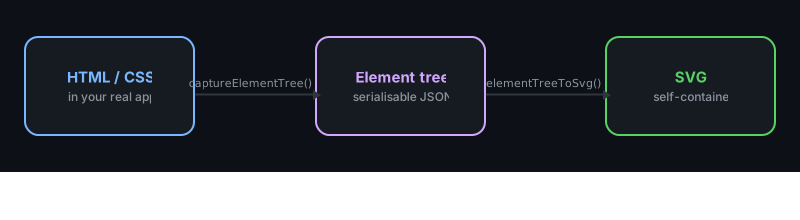
Stage 1: in-page capture
When you call captureElementTree(page, selector, viewport),
Domotion serialises a self-contained "capture script" and asks Playwright to
page.evaluate() it inside the captured page. That script:
- Walks the DOM under
selectorin paint order. - Reads
getBoundingClientRect()andgetComputedStyle()for every element. - For text-bearing nodes, splits text into segments and (where possible) measures the per-character viewport-relative x offsets using a Range object — so the renderer can place each glyph exactly where Chromium placed it.
- Detects un-renderable regions (color-bitmap glyphs, emoji, certain backdrop-filter layers, etc.) and tags them with a raster rectangle so Stage 2 can fill in a screenshot.
- Returns one big
CapturedElement[]tree plus a list of capture warnings for unsupported features.
Because the capture script is serialised and run via
evaluate(), it can't import from the rest of
Domotion's source — only globals available in the page (document,
getComputedStyle, etc.) and the arguments passed in. This is
why you'll see plain JavaScript, not TypeScript module imports, inside
the capture stage.
Stage 2: bitmap glyph rasterisation
Some glyphs can't be expressed as font outlines: emoji, color-bitmap
codepoints, certain Apple-only typographic shapes. For each such region the
capture script left behind a rectangle; back in Node, Domotion calls
page.screenshot({ clip }) on each unique rect, embeds the PNG
as a base64 data URI on the matching tree node, and dedupes by
(text, color, fontSize, fontWeight, size) so the same emoji
used five times in the document only screenshots once.
This stage is invisible to you — it just adds a fraction of a second to capture latency when there are bitmap glyphs to handle.
Stage 3: SVG rendering
elementTreeToSvg(tree, width, height, idPrefix?) is pure:
no Chromium, no I/O, just string concatenation. It walks the captured tree
recursively and emits SVG primitives:
| Captured feature | SVG output |
|---|---|
| Background colors and per-side borders | <rect> with rounded corners and clip paths. |
| Box shadow | Layered <rect> + <filter> with feGaussianBlur. |
| Text segments | <path> + <use> with shared glyph defs (path mode), or <text> with CSS font properties (text mode). |
| Linear / radial gradients | <linearGradient> / <radialGradient> with px-positioned stops. |
| Clip paths and masks | <clipPath> / <mask> entries hoisted to <defs>. |
| Form controls | Hand-rolled SVG markup mimicking Chromium's user-agent shadow DOM (see Form controls). |
| Transforms | transform="translate(...) rotate(...) ..." on the wrapping group. |
| Raster fall-backs | <image href="data:image/png;base64,...">. |
The renderer emits readable, lightly indented SVG so the output diffs
cleanly. If you want it small for production, pipe it through
optimizeSvg().
End-to-end timing
Order-of-magnitude numbers on an M1 MacBook for a typical hero-card capture:
- Browser launch: ~400 ms (one-time, amortised across many captures).
- Page load & settle: 200–800 ms depending on
networkidle, fonts, and your own waits. - Stage 1 (in-page capture): 30–120 ms for a few hundred
elements; the bottleneck is per-element
getComputedStyle. - Stage 2 (bitmap rasters): 0 ms when there are no emoji / color-bitmap glyphs; ~60 ms per unique screenshot otherwise.
- Stage 3 (SVG render): < 30 ms — string ops only.
If you're capturing many frames, keep one browser open for the duration of
your script (chromium.launch() once, capture in a loop, then
browser.close()) — relaunching dominates the timing.
Where to intervene
- Modify the page before capture. Anything you can do with
Playwright before
captureElementTreeworks:page.addStyleTag,page.evaluate,page.click, etc. Hide a cookie banner, click a "show more" toggle, swap a color scheme. - Inspect or transform the tree. The
CapturedElement[]returned from Stage 1 is a plain serialisable object. You can mutate it before passing toelementTreeToSvg(e.g. clip out an element, replace a text node, scale a region). - Post-process the SVG. The output is a string. Pass it
through
optimizeSvg()for size, or run your own regex if you need to re-namespace IDs or strip a class.
Next
The element tree walks the
CapturedElement shape in detail, then
Text rendering covers the path / text mode
trade-off.